Every FPV pilot knows the feeling. You split-S over a tree branch, pull out of a hard dive, or attempt a sharp 180-degree turn, and suddenly your quad begins to shake violently. The motors scream, your HD video feed turns into a blurry vibration, and you temporarily lose tight control of your altitude.
This is prop wash.
Prop wash is one of the most frustrating aerodynamic hurdles in multirotor flight. While it is impossible to eliminate the physics behind it completely, you can drastically reduce its impact. By combining smart flight mechanics with precise firmware tuning, you can transform a shaky, unstable recovery into a locked-in, cinematic finish.
The Physics: What Actually Causes Prop Wash?
To solve prop wash, you first need to understand what your drone is fighting.
When your FPV drone is hovering or flying forward in clean air, the propellers draw clean, undisturbed air from above and push it downward, creating a high-velocity column of thrust.
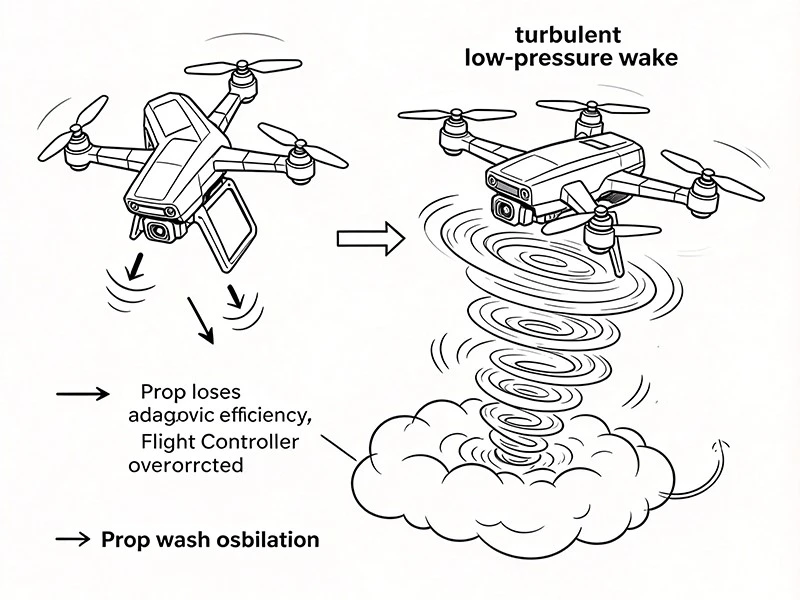
Prop wash happens when your drone descends or turns directly into its own turbulent wake.
When you pull out of a fast dive or complete an aggressive flip, the drone drops straight into the dirty, swirling, low-pressure air it just generated. Because this air is already moving rapidly and filled with vortexes, the propellers lose their aerodynamic efficiency. The Flight Controller (FC) tries frantically to stabilize the craft, resulting in rapid, over-corrective oscillations. This is what you see as "prop wash handling oscillations."
Part 1: Modifying Your Flying Style for Smooth Recoveries
Before changing a single setting in Betaflight, you can mitigate up to 50% of prop wash simply by adjusting how you fly. Clean lines beat heavy filtering every time.
1. Carry Forward Momentum (The "Arc" Strategy)
The absolute worst way to pull out of a dive is perfectly vertical. If you dive straight down and pull up on the pitch stick while keeping your horizontal trajectory at zero, you are guaranteed to fall straight into your dirty air.
The Fix:
Pull out of dives with a slight forward or sideways arc. By steering the drone slightly ahead of its descent path, you ensure the propellers are always biting into fresh, undisturbed air.
2. Smooth Throttle Management
Panicking and slamming the throttle from 0% to 100% at the bottom of a drop aggravates prop wash. The sudden surge of RPMs creates massive aerodynamic turbulence right when the quad is at its most unstable point.
The Fix:
Roll on the throttle progressively just before you reach the lowest point of your maneuver. Catching the weight of the drone early with smooth throttle application prevents it from sinking into the deepest part of the dirty air column.
3. Clear the Wake with a Quick Punch
If you must execute a maneuver that puts you directly in your own wash-like a vertical juicy flick-give a tiny, rapid burst of throttle right before the transition to blast the turbulent air down and away from your frame, then complete the maneuver in the cleared pocket.
Part 2: Betaflight Tuning Tips to Eliminate Prop Wash Shakes
If your flight technique is clean but the quad still shudders during hard turns, it's time to plug into Betaflight. Eliminating prop wash through tuning requires balancing Proportional (P) and Derivative (D) gains while minimizing filter latency.
1. Boost Your D-Term (The Shock Absorber)
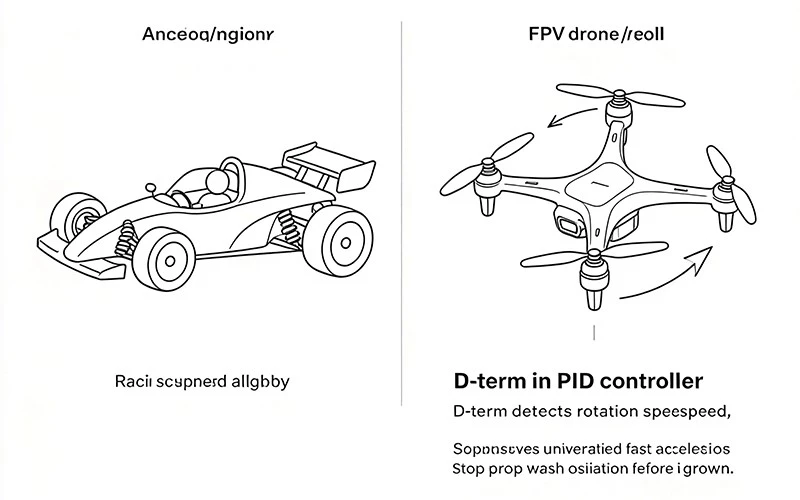
In a PID controller, the D-term acts as a dampener. It looks at how fast the drone is rotating and fights against rapid, unwanted changes in acceleration. Increasing your D-term on Pitch and Roll acts like stiffening the suspension on a racecar, catching the prop wash oscillations before they amplify.
How to tune: In the Betaflight PID tuning tab, gently slide your D Gains slider up (in increments of 2 or 3 points).
The Limit: Higher D-term values cause your motors to work harder and generate heat. Always land after a 60-second flight of hard pullouts and feel your motors. If they are burning hot to the touch, back down your D-term immediately.
2. Match with P-Term Assertiveness
If your D-term is high but your P-term (the muscle of the controller) is too low, the drone will feel muddy and won't have the authority to pull out of the wash cleanly. Ensure your P and D ratio is balanced. Using the Betaflight Master Multiplier slider is a safe way to raise both proportionally.
3. Lower Filter Latency (The Secret Weapon)
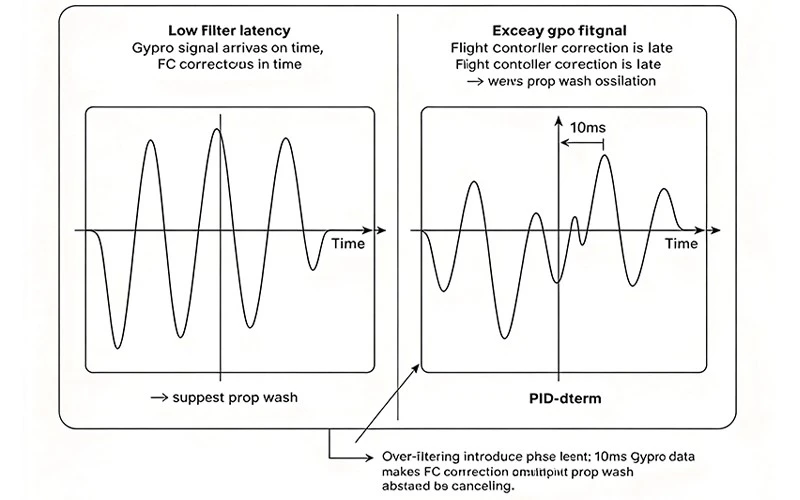
Your Flight Controller cannot fight prop wash if it reacts to old data. Modern gyro filters smooth out high-frequency noise from your motors, but excessive filtering introduces phase delay (latency). If the FC receives gyro data 10 milliseconds late, its corrections will actually feed into the prop wash instead of stopping it.
How to tune: If your build has clean hardware and fresh props, slide your Filter Sliders to the right (moving toward less filtering/lower latency).
Safety Check: Lowering filters allows more high-frequency noise to reach the motors. Monitor motor temperatures carefully when adjusting filters.
4. Enable RPM Filtering (Bi-Directional DShot)
If you haven't enabled Bi-Directional DShot, do it today. RPM filtering tells the flight controller the exact RPM of every motor in real time. This allows Betaflight to place razor-sharp notch filters precisely on the motor noise frequencies, allowing you to strip away massive amounts of generic filtering. Lowering that general filtering dramatically reduces latency, giving you the crispest prop wash mitigation possible.
5. Quick Guide: How to Enable Bi-Directional DShot in Betaflight
Check Compatibility: Ensure your ESCs are running modern firmware that supports bidirectional communication (such as BLHeli_32, AM32, or Bluejay).
Connect to Betaflight: Plug in your flight controller, open the Betaflight Configurator, and navigate to the Motors tab.
Toggle the Switch: Scroll down to the ESC/Motor Features section and turn on the Bidirectional DShot toggle.
Set Your Motor Poles: Enter the correct number of magnetic poles for your motors (most standard 5-inch motors have 14 poles; check your motor specifications if you fly micro or macro sizes).
Save and Verify: Click Save and Reboot. Plug in a flight battery, return to the Motors tab, and verify that your Error Rate (E:) reads exactly 0% across all four motors while they spin.
Hardware Checklist: Is Mechanical Noise Ruining Your Flight?
Sometimes, a bad prop wash problem isn't a tuning issue at all-it's a hardware issue. No amount of software tuning can fix a mechanically noisy FPV drone. Ensure your quad meets these baselines:
Change Bent Props:
Even a microscopic ding in a polycarbonate propeller changes its aerodynamic profile, drastically increasing vibrations and compounding prop wash.
Tighten All Screws:
Loose arm screws or a rattling action camera mount generate vibrations that confuse the flight controller's gyro.
Check Your Stack Isolation:
Ensure your flight controller grommets aren't squished too tightly and that no stray wires are pressed hard against the gyro chip.
Hardware Fixes: Upgrading Your Rig to Fight the Wash
If you have optimized your tune and cleaned up your flight lines but still can't shake the shudders, your hardware might be hitting its physical limits. Upgrading these three critical components can give your flight controller the mechanical advantage it needs:
Low-ESR Capacitors:
Rapidly fighting prop wash forces your ESCs to draw massive, erratic currents, creating electrical noise that corrupts gyro data. Solder a high-quality, low-ESR capacitor (like a 35V 1000uF Panasonic FM series) to your main battery leads to smooth out power spikes and keep your signal clean.
The Perfect Balance
Handling prop wash perfectly requires a marriage of software optimization and pilot control. By cleaning up your lines, managing your throttle arcs, and lowering your filtering latency to let your D-term do its job, you can achieve the locked-in, predictable flight feel required for aggressive freestyle and smooth cinematography alike.
Next time you hit the field, don't just fight the wash-anticipate it, fly around it, and let a refined tune handle the rest.
FPV Prop Wash Frequently Asked Questions
Q: Can you completely eliminate prop wash on an FPV drone?
A: No, you cannot completely rewrite the laws of aerodynamics, but you can minimize it to the point where it is unnoticeable in your goggles and HD footage through clean flight technique and tight PID/filter tuning.
Q: Will heavier or lighter propellers help reduce prop wash?
A: Lighter, lower-pitch propellers generally handle prop wash better because they have less rotational inertia, allowing your motors to change RPM faster and respond quicker to flight controller commands.
Q: Why do my motors get hot when I try to tune out prop wash?
A: Fighting prop wash requires the flight controller to rapidly change motor speeds using the D-term; if your D-gain is too high or your filter latency is too low, the motors will over-correct constantly, generating excess electrical heat.
Q: Does prop wash happen more on 4S or 6S battery setups?
A: Prop wash can happen on both, but 6S setups typically recover much faster because the higher voltage provides greater motor torque, allowing the propellers to bite through turbulent air with less delay.
Q: Can a loose flight controller stack cause prop wash oscillations?
A: Yes, if your flight controller stack is loose or your rubber damping grommets are degraded, mechanical vibrations will mimic prop wash, confusing the gyro and making software tuning impossible.
Q: What is the difference between prop wash and a bad PID tune shake?
A: Prop wash oscillations only happen during specific high-turbulence transitions-like pulling out of a dive-whereas a bad PID tune will cause the drone to oscillation or shake during normal hovering, straight flight, or hard throttle punches.